
Collect candidate details as you chat
Answers become searchable profiles your team can review and update. You can also bring in existing information from spreadsheets or CVs.
Turn WhatsApp conversations into organized candidate profiles. Talent Flow collects the details your team needs, keeps conversations together, and helps you find suitable candidates for each client request. Your team can step into the conversation whenever a personal response is needed.
Prefer to try it first? Send a message and the bot will greet you exactly as it greets a candidate.
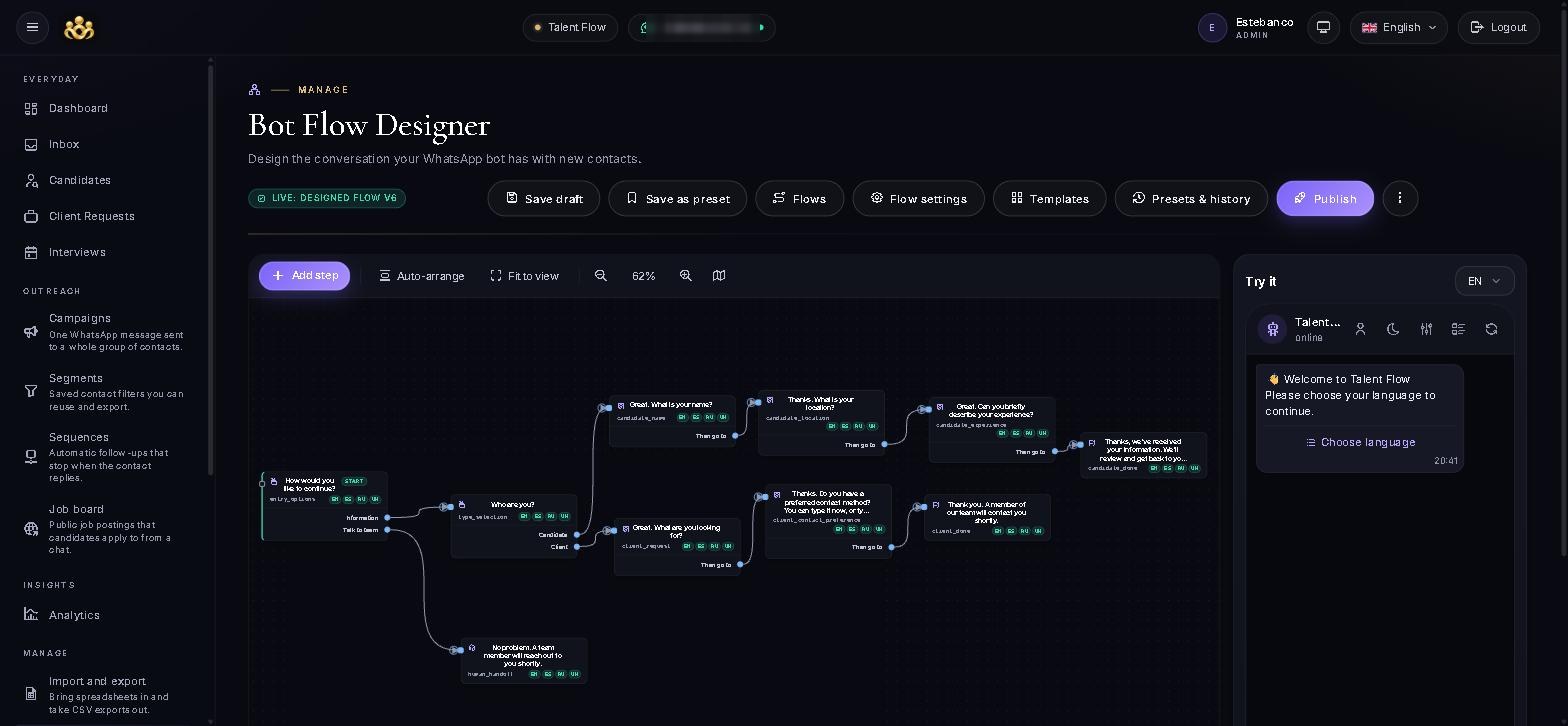
Collect the information you need before your team picks up the conversation.
Give candidates a clear starting point, with a greeting and options in their preferred language.
Guide the conversation around the information your agency needs, such as experience, location and availability.
Save answers and documents to a candidate profile, with the conversation available to your team.
Review potential matches, prepare a branded CV, or continue the conversation yourself.
Six things your team stops doing by hand, on the channel your candidates already use.
Answers become searchable profiles your team can review and update. You can also bring in existing information from spreadsheets or CVs.
Manage chats in a shared inbox, with a clear owner for each conversation. When someone needs a personal response, your team can take over with the previous messages in view.
Compare candidate profiles with client requests. AI suggests potential matches and explains the reasoning, helping your recruiters decide who to review.
Create a CV from a candidate’s profile, add your branding, and review the wording before sharing it with a client.
Group contacts and schedule follow-up messages. Automated sequences stop when someone replies, so your team can continue the conversation. Sending limits, cooldowns and automatic pausing keep your outreach inside what Meta allows.
Review conversation activity, response rates and completed flows to understand what is working and where the process could be clearer.
The same conversation runs on Telegram, Instagram DMs and Facebook Messenger, and every chat lands in the same inbox and the same profiles.
Connect your company Google Calendar once. Each interview is booked there with a Google Meet link and invitations, busy times are never offered, and everyone gets WhatsApp reminders in their own time zone. Outside your working hours, chats take an out-of-hours path.
Send signed events to your own systems, read a step-by-step log of what the bot did, and control who on your team can sign in and what they can do.
The workspace for managing conversations, reviewing candidates and planning the next step. Click any screen to view it full size.
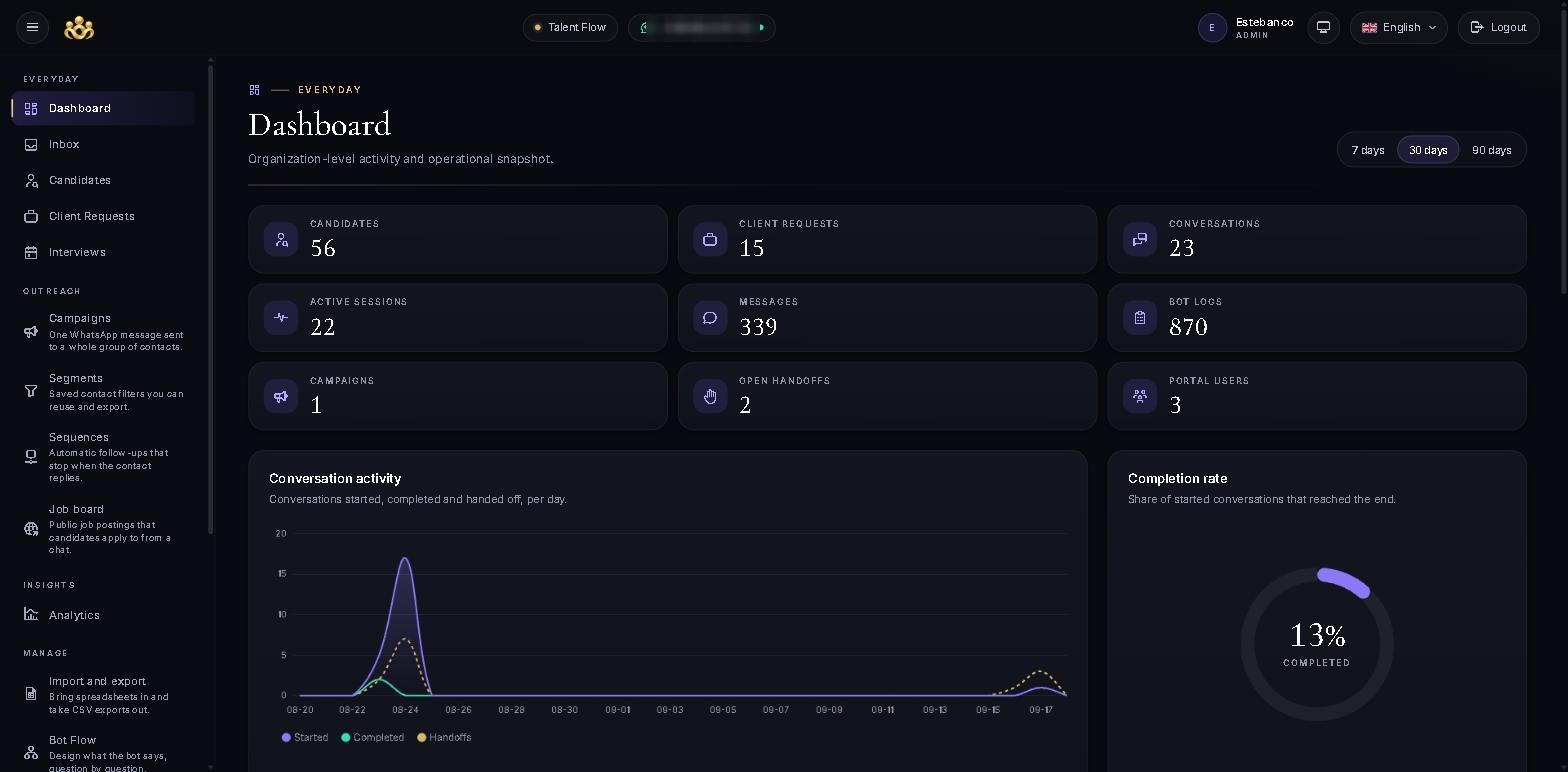
See recent activity and how people are progressing through your conversations.
Set up questions, review different paths and test the experience before publishing.
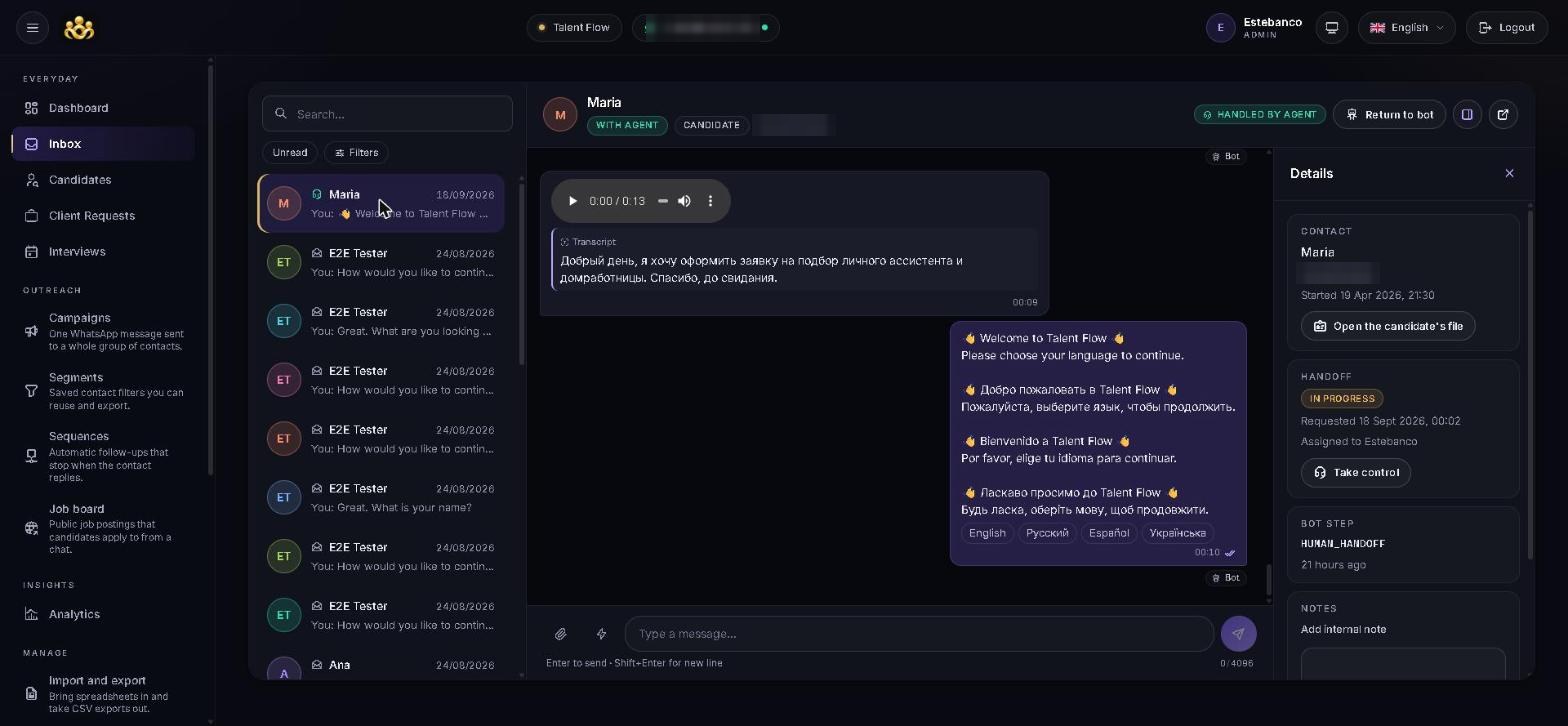
Read messages, review voice-note transcripts and see who is handling each chat.
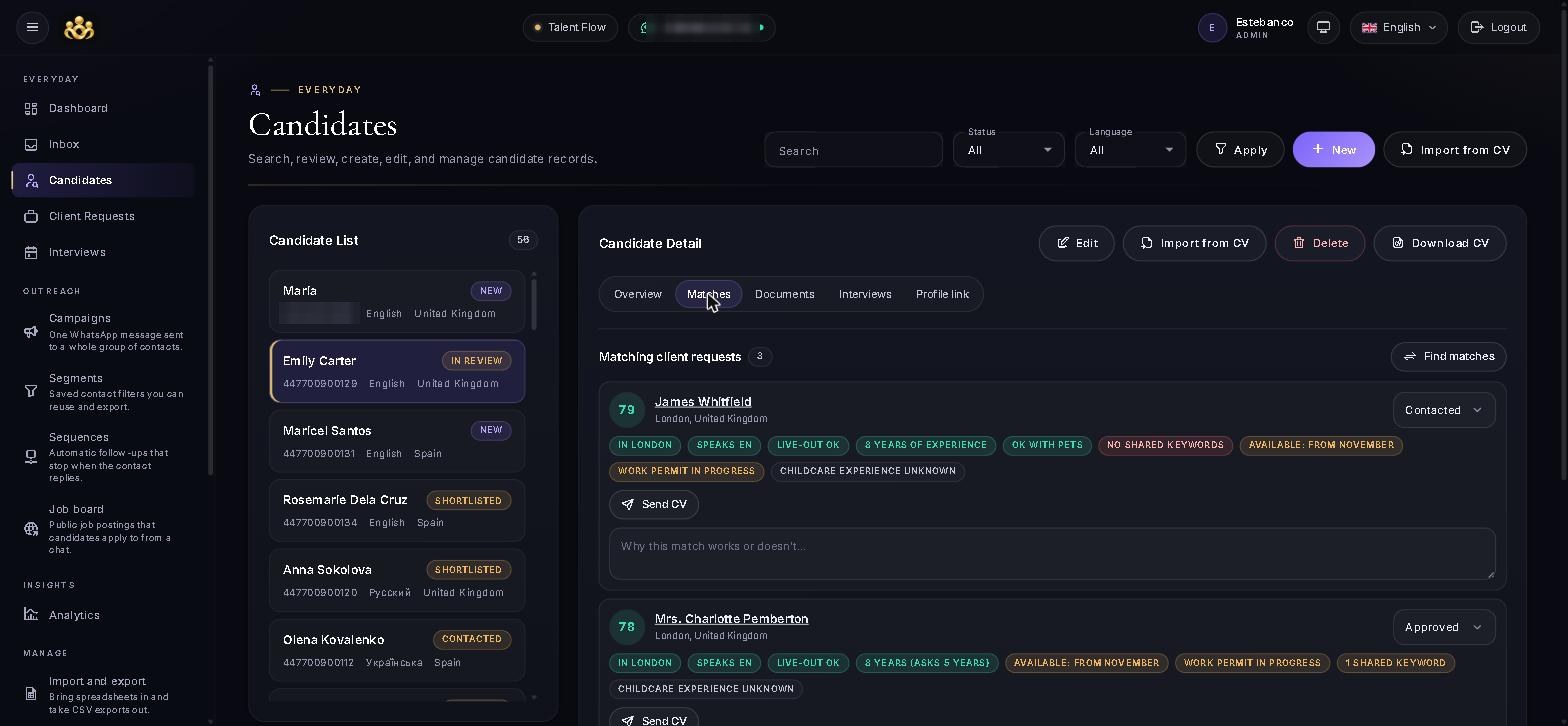
Keep candidate details, documents, interviews and CVs together.
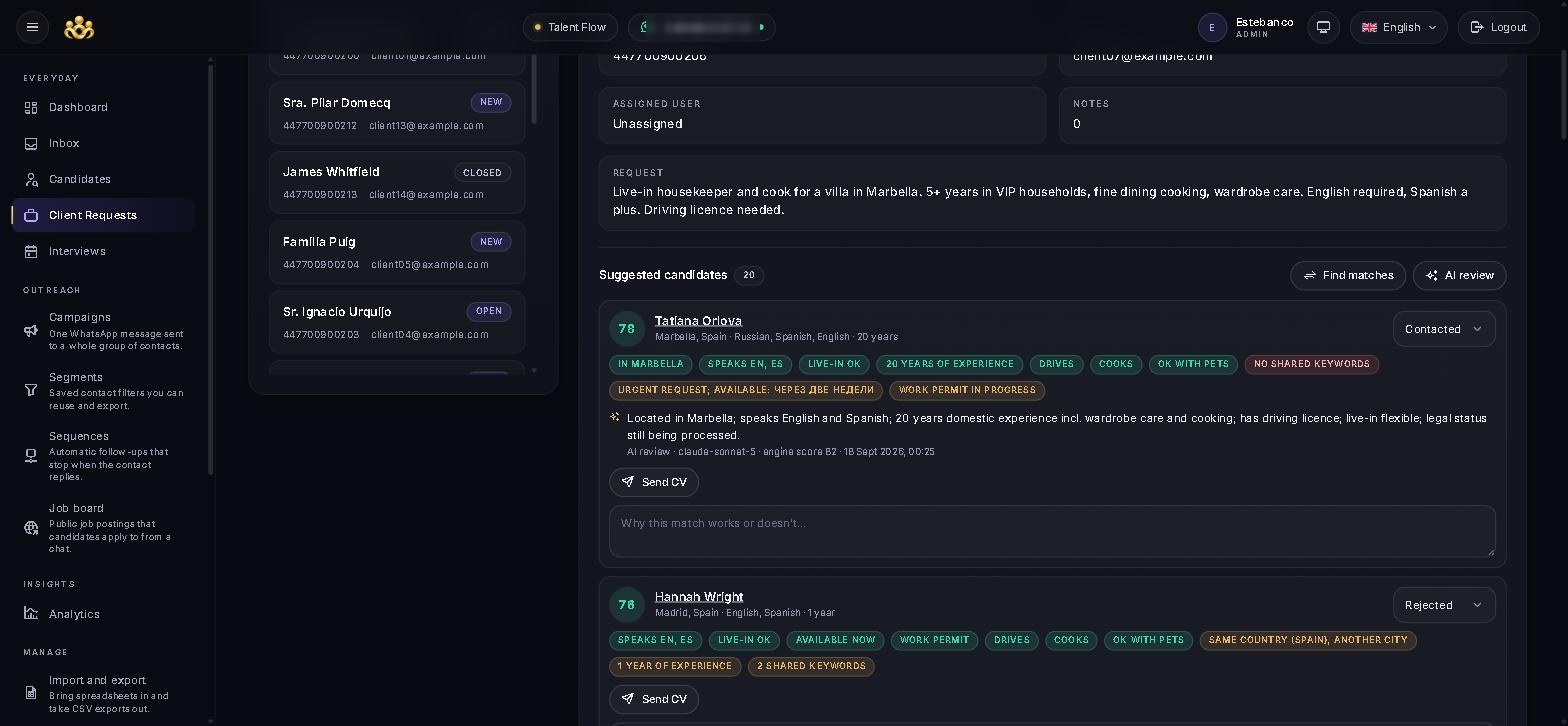
Review suggested matches for a client request, with an explanation for each recommendation.
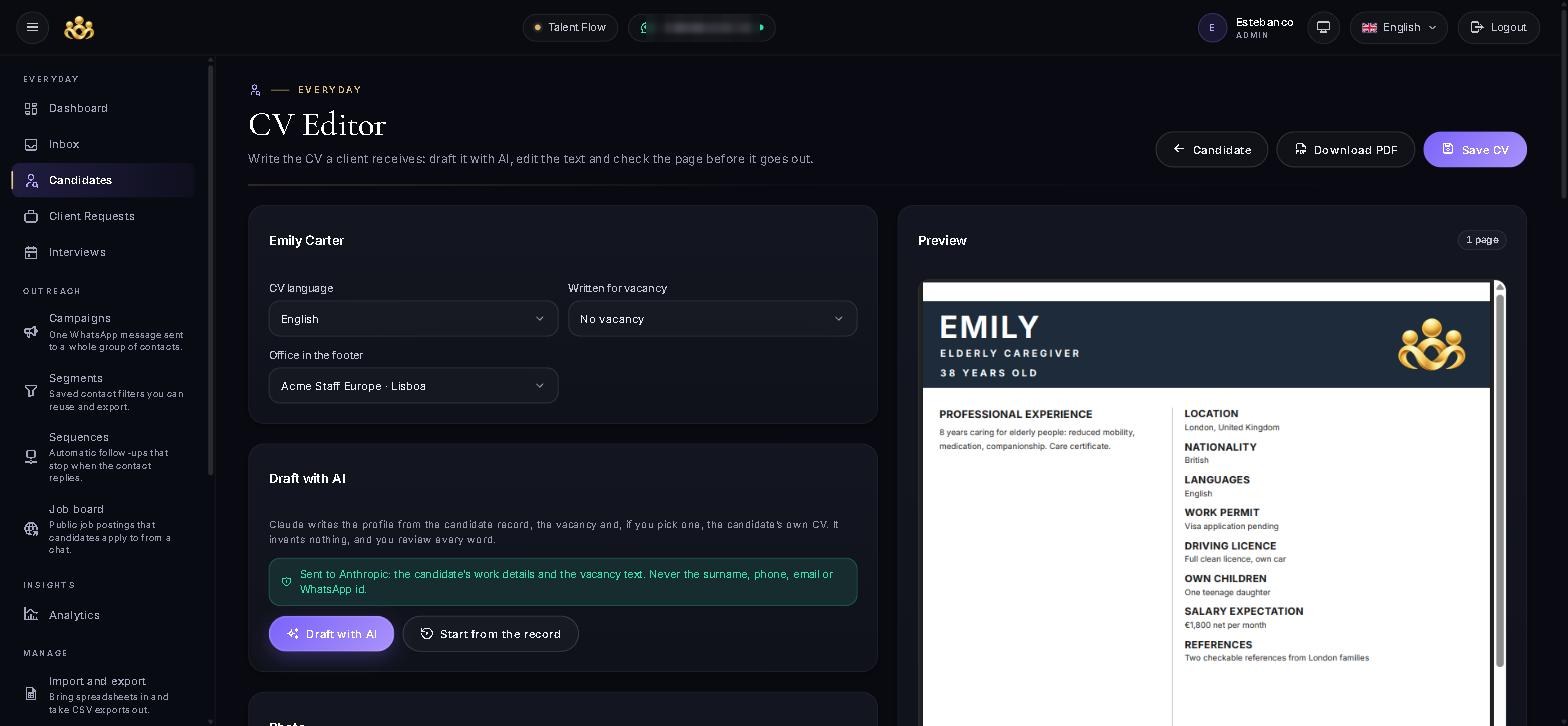
Edit the profile text and prepare a CV with your agency’s branding.
Tell the AI designer what you want to ask and how the conversation should work. It creates a draft for you to review, test and adjust before publishing.
Start with a new conversation or ask for a change to an existing one. Write naturally, as you would explain it to a colleague.
“Ask candidates where they live, which languages they speak and when they can start.”
Read the proposed questions, follow the different conversation paths and check a sample conversation. The designer also highlights assumptions and points that need your attention.
Make any final changes and publish the flow yourself. Until then, your current conversation stays live.
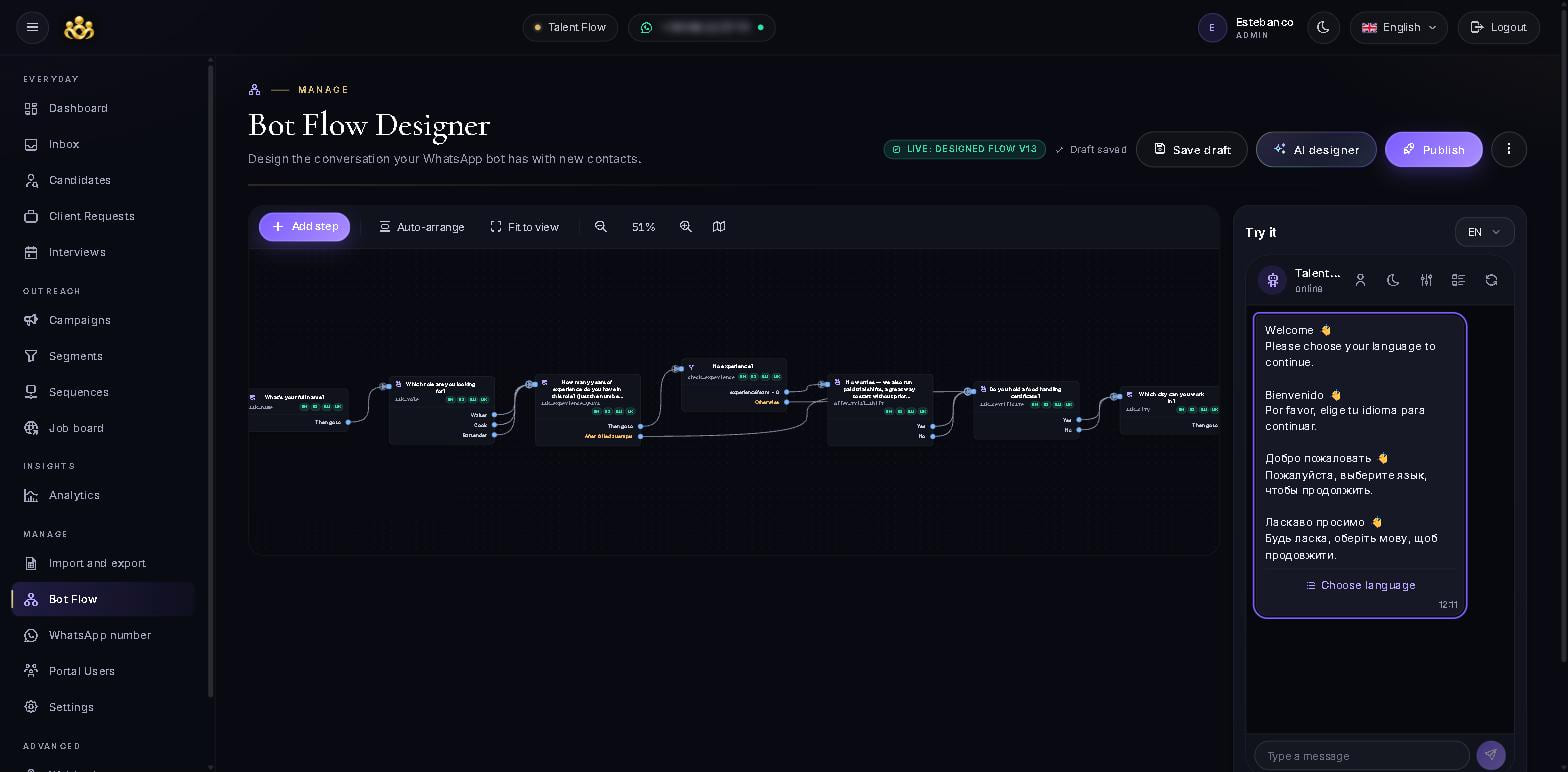
You stay in control AI-generated changes are saved as drafts. Nothing goes live until you choose to publish it.
No canvas and no syntax — one box, up to 4,000 characters, in whatever language you think in. Example prompts are one tap away if you would rather start from something.
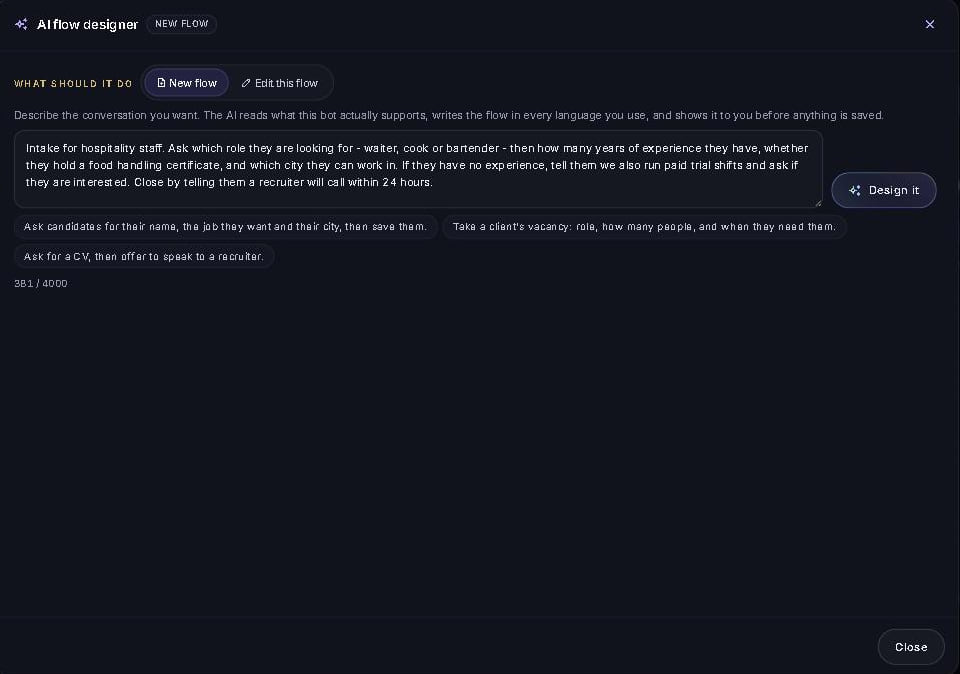
Before writing anything, the designer asks the platform what your organization actually supports — which step types exist, which fields a candidate profile has, what WhatsApp allows — and writes against that, then checks its own work.
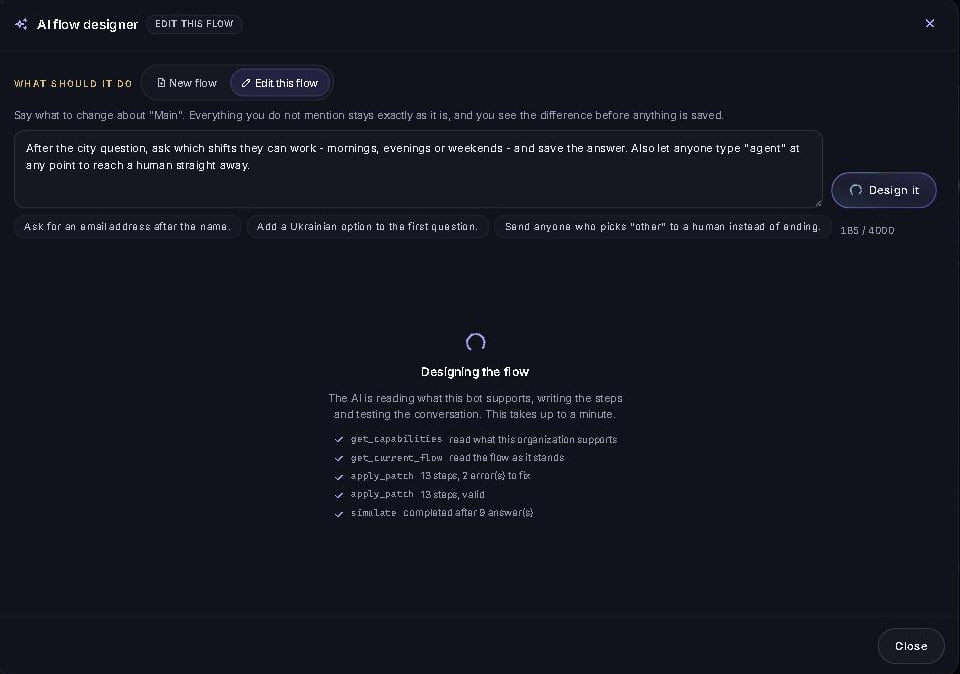
What the conversation does, step by step, in a paragraph anyone on your team can read. Then the decisions it made on your behalf and the points that need your attention — a missing option to contact your team, a fallback nobody set.
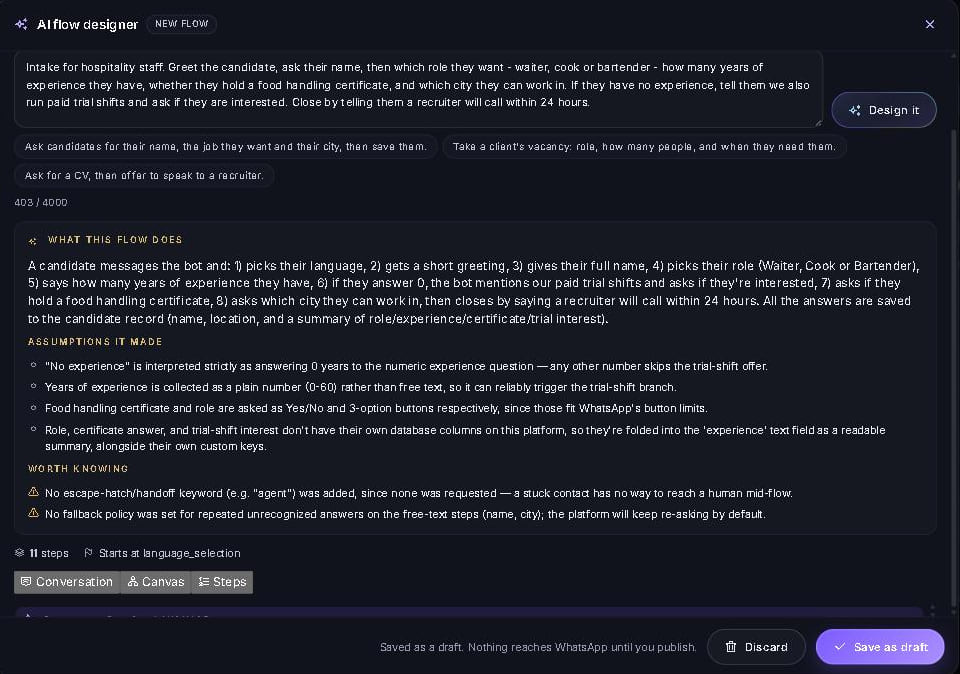
The designer runs the conversation end to end and shows you the transcript — the greeting, the buttons, the path someone takes when they answer “no experience”. At the bottom, every field that conversation would have saved to the candidate profile.
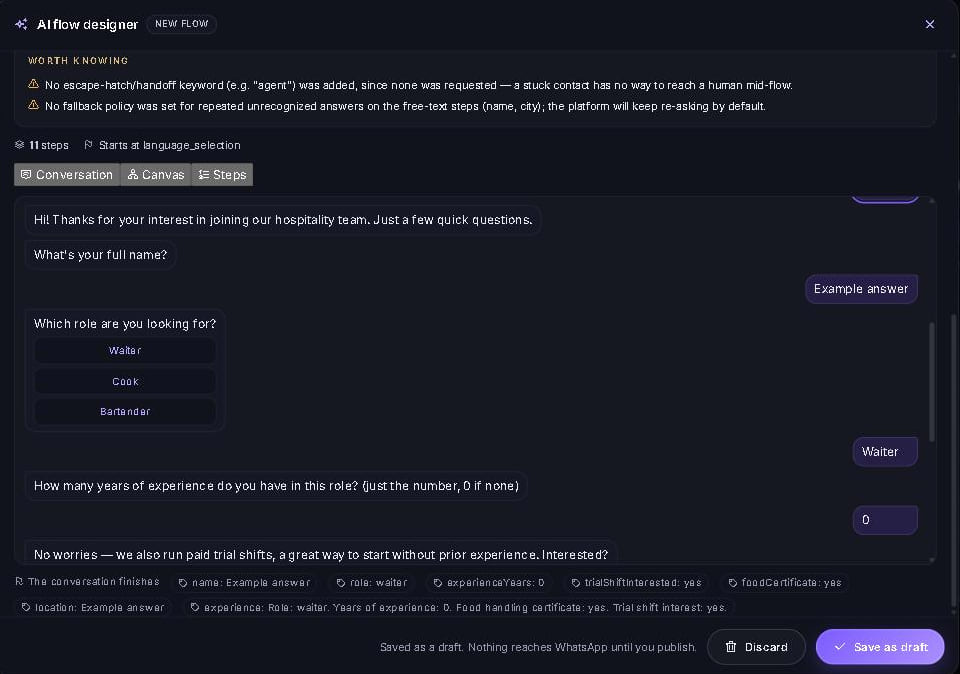
The same conversation drawn as a map: every question, every button, every path and where it leads. Zoom, pan and follow the route a candidate takes without leaving the review.
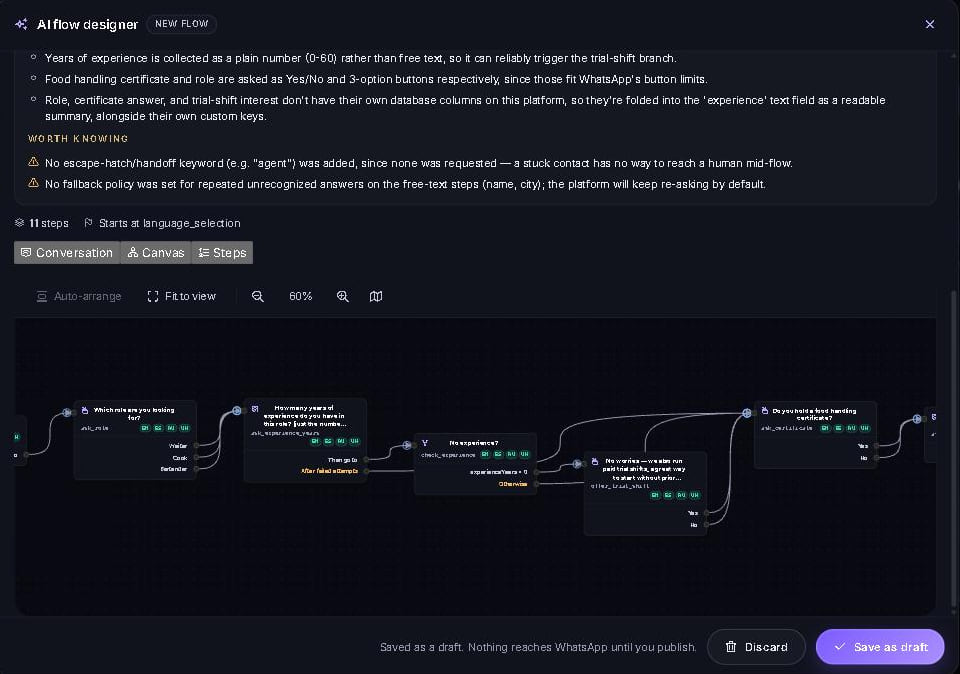
A plain outline of the conversation: each step, its type, the exact wording it will send and where each answer leads next. Nothing is summarized away.
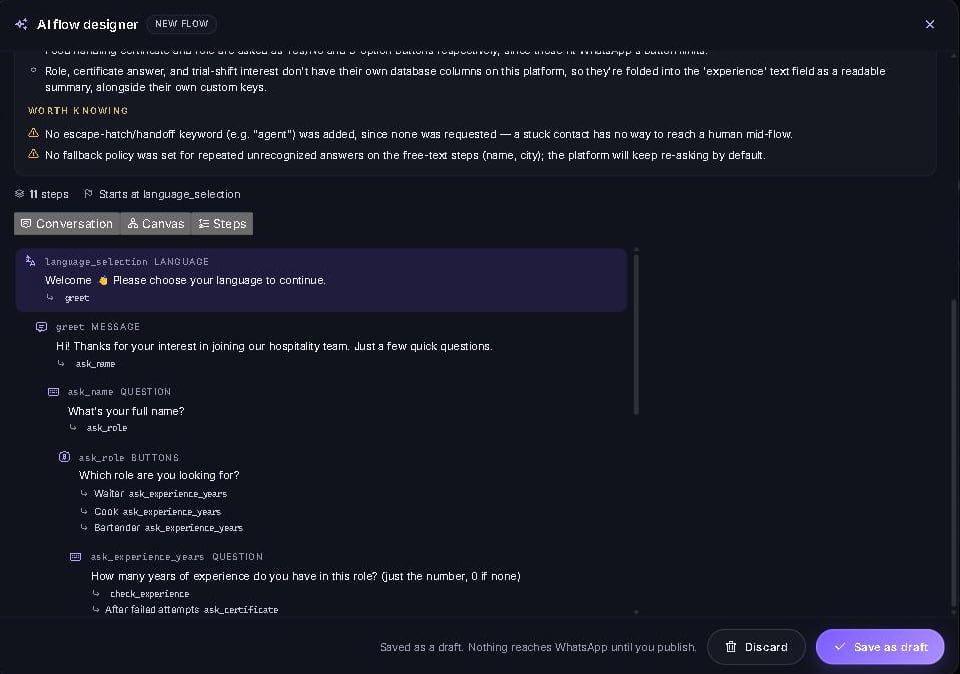
Ask for one change in one sentence. The designer tells you how many steps it added, how many it touched and what it named them, and you review the proposed changes before applying them.
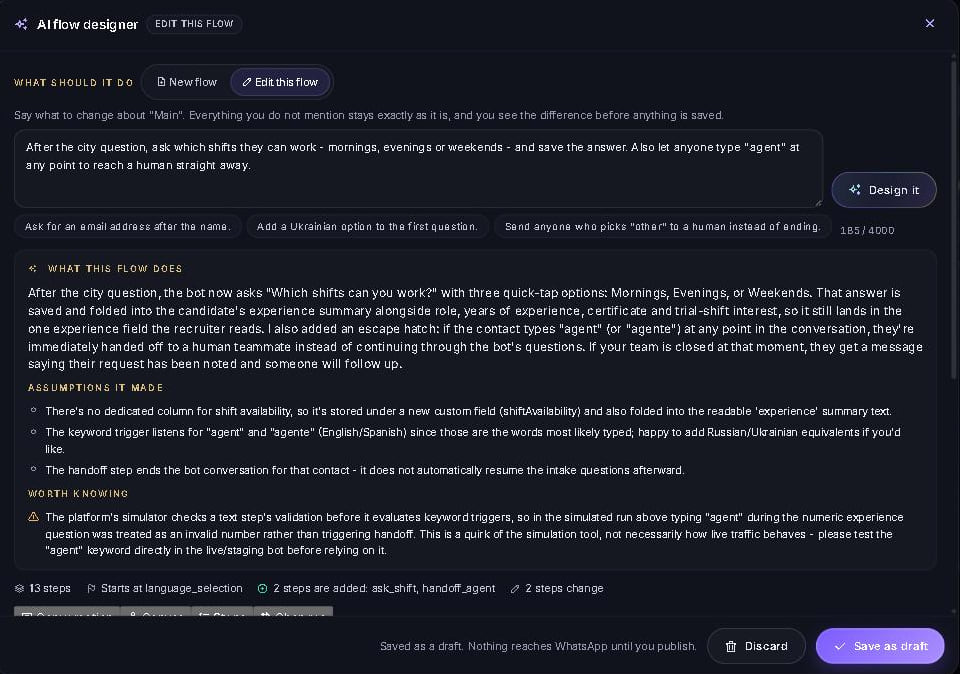
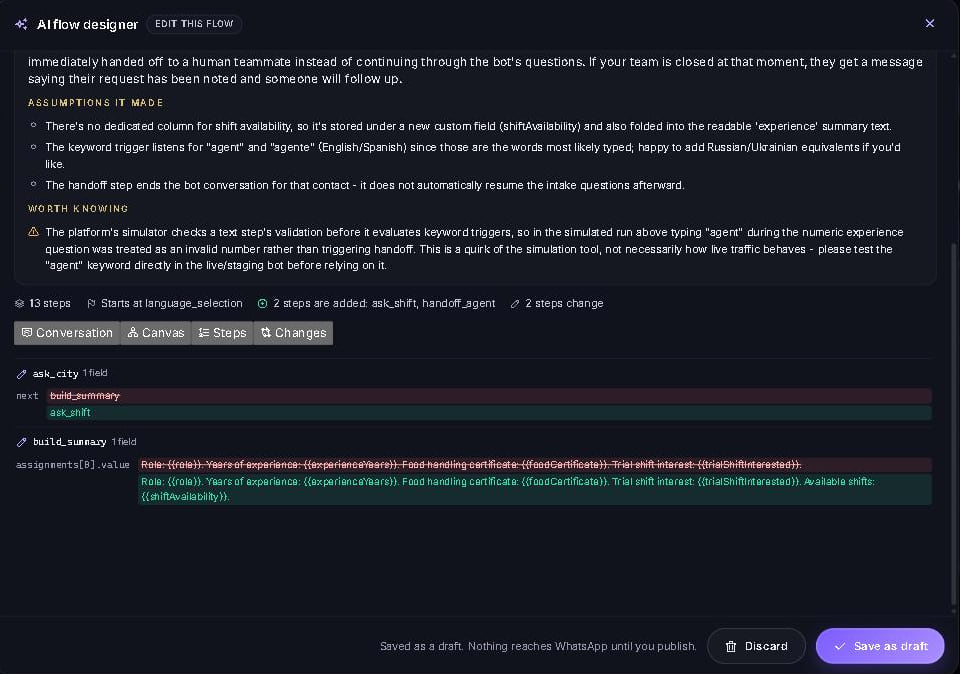
Not “we updated your conversation” — the old wording and the new one, on the precise field that moved. If a message gained a sentence, you read both versions side by side and approve that, or you don’t.
Approve it and the conversation drops into the visual builder as a draft, next to the version that is live. Move a step, retype a sentence, test it again — it reaches WhatsApp only when you press Publish.
The designer can only write to a draft. Publishing to your WhatsApp number stays a deliberate, human click.
Step types, candidate fields, WhatsApp’s button limits — the designer works from a live description of your organization, so what it proposes actually runs.
Every step arrives already translated into each language your bot speaks, so a new question never lands in English for a Ukrainian candidate.
Built into the conversation builder in the organization portal. From prompt to reviewed draft in about a minute.
Guide candidates through the conversation in English, Spanish, Ukrainian or Russian. Your team can use the platform in these languages too.
Yes. Your team can take over a conversation in the shared inbox and see the previous messages. You can return the conversation to the bot when appropriate.
Yes. You can import candidate information from spreadsheets or CVs and manage it alongside profiles collected through conversations.
No. You can build them visually or describe what you need to the AI designer, then review and test the draft.
No. Changes stay in a draft until someone on your team chooses to publish them.
English, Spanish, Ukrainian and Russian, for both guided conversations and the platform interface.
WhatsApp, Telegram, Instagram direct messages and Facebook Messenger. Every conversation lands in the same inbox and the same candidate profiles.
Each organization has its own database, access is limited to the people you invite, and you can delete a candidate’s data on request. Read the privacy policy
What shipped recently and what we are building now. Everything under “Available now” is running in production.
Bring the spreadsheets you already keep. Import Excel, CSV or Google Sheets, clean and deduplicate the data, and turn it into profiles the bot and the portal can search. Export to CSV whenever you like.
AI reads every client request and every candidate profile and ranks the closest matches, with a plain-language explanation of why each one fits, in both directions.
Turn any candidate profile into a laid-out CV in your house style, with your logo and an AI-drafted summary you review word by word, ready to send to a client.
Interviews are booked in your Google Calendar with a Google Meet link. The bot offers times inside your working hours, skips anything already busy, and sends confirmations and reminders on WhatsApp.
Ask for ID, permits or certificates right in the conversation, store them on the candidate profile, and get contracts signed without leaving the chat.
Candidates like sending voice notes. The bot transcribes them, pulls out the answers and files them like any other reply, in any of the supported languages.
The same conversation runs on Instagram direct messages and Facebook Messenger, with every chat landing in the same inbox and the same profiles.
Publish a client request as a public job page in one click, translated with AI, and give candidates a link where they update their own profile and availability.
A Telegram bot runs the very same conversation, alongside the other apps your candidates already use. One inbox, one candidate database, every channel.
Google Calendar is already connected. Next, Outlook and Microsoft 365, so agencies on Microsoft get the same booked interviews, invitations and busy-time checks.
Publish an opening to InfoJobs, Indeed and LinkedIn from the job page in one step, and have every applicant come back into the same conversation and the same candidate database.
Add knockout questions and short assessments as a conversation step. Answers are scored automatically, pass or fail changes the path, and the score feeds matching.
Ask candidates to record a short introduction in the chat. Recruiters review it in the inbox next to the profile, without a separate video-interview tool.
Reach candidates by email or SMS on the same contact record when the WhatsApp window is closed or when a template would cost more than a plain message.
Ready-made Zapier and Make apps on top of the existing webhooks and API, followed by named connectors to Bullhorn, Greenhouse and other systems agencies already run.
The inbox, candidates and interviews on the phone, with push notifications for handoffs and new applications.
SAML single sign-on with Google Workspace or Microsoft Entra, plus two-factor authentication for every portal user, for agencies with security requirements.
Tell us how you currently manage candidate enquiries. We’ll walk you through the platform and show you where it could help your team.
Send a message and one of our team picks up the conversation from there.